


Baseball Star
4.312.77K Reviews
App Specs
- Version
- 1.7.9
- Updated On
- License
- Free
- Downloads
- 10,000,000+
- Developer
- playus soft
- Categories
- Sports
- Platform
- Android, iOS
Screenshots
 Analysis by AppCompare
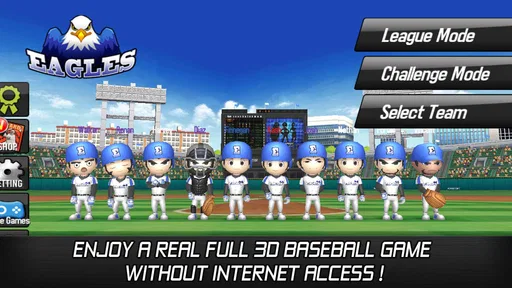
I’m drawn to sports games that let me get into the action without demanding a full evening, and Baseball Star has an appealing hook: I can play baseball even when I’m offline. That makes it easy to pick up during a quiet break or while travelling, rather than treating every session like a scheduled match. The game is free, developed by playus soft, and sits in the sports category. Its audience is broad, too: it carries an Everyone age rating, while its 4.3 average from around 195,000 ratings suggests it has found plenty of players.
A ballpark mood built for quick sessions
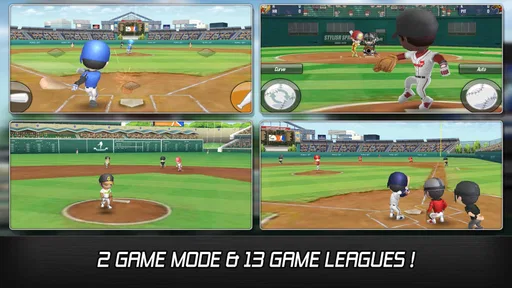
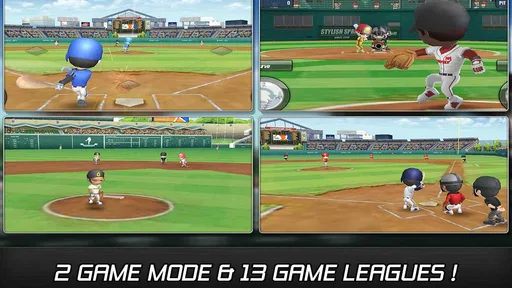
The most useful way to approach this game is as a portable baseball pastime, not a replacement for watching a real season or mastering a deep console simulation. Its 3D presentation gives the matches a clear visual setting, while the familiar rhythm of batting and pitching keeps the action readable. I like that combination because it makes the game feel recognizably like baseball without asking me to learn a complicated control scheme before I can enjoy a turn at the plate.
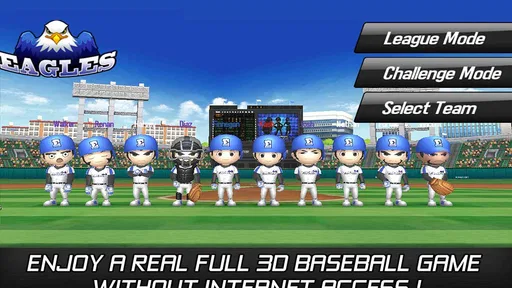
The offline angle is more than a convenient line on a feature list. It changes when I’d choose to play: a commute, a waiting room, or a patchy connection becomes a reasonable moment for a match. If you want a sports game that depends on live opponents or constant connectivity, this is not the same kind of experience. But for a solo session that can fit around everyday life, being able to play without internet access is a meaningful advantage.
What the presentation contributes
Baseball’s setting does a lot of work for a sports game: the field gives each play a clear purpose, and the contrast between a batter waiting and a pitch arriving creates natural tension. Here, the 3D ballpark framing helps those moments feel like parts of a match rather than isolated taps. The audio cues also suit the sport’s pace, giving contact, crowd response, and officiating a place in the scene. I find that more effective than constant noise; baseball needs room for anticipation as much as it needs a burst of excitement.
That presentation is best enjoyed in short bursts. A quick session can provide the satisfying beat of setting up a play and seeing it resolve, while a longer stretch is where repeated animations and familiar match rhythms may become more noticeable. If you’re hoping for the shifting spectacle of a broadcast or the tactical density of a full simulation, you may want another game. Baseball Star’s appeal is the compact, playable mood of a ballpark, not a promise that every inning will feel dramatically different.
Gameplay That Hits It Out of the Park
First off, the gameplay in Baseball Star is as smooth as a perfectly executed double play. It’s got that sweet spot balance between simulation and arcade-style fun, making it accessible whether you’re a seasoned gamer or just someone looking to kill some time. The controls are intuitive, which means you won’t be fumbling around trying to figure out how to swing the bat or pitch that perfect curveball.
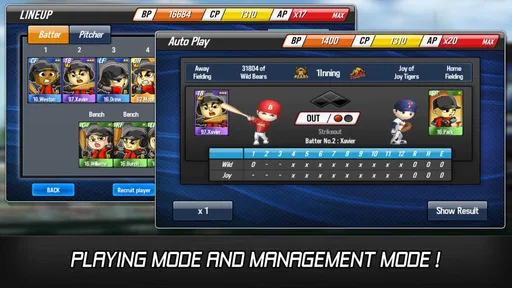
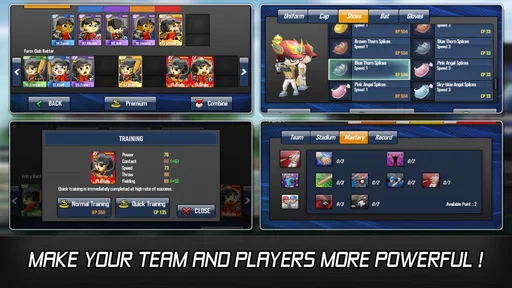
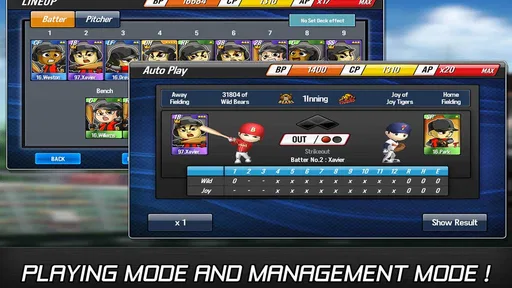
The game offers a variety of modes, from league play to challenge modes, so you’ll never find yourself bored. I particularly enjoyed the league mode, where you can build and manage your own team. You get to make strategic decisions, like what players to sign and how to train them, which adds an extra layer of depth to the game.
Worth Reading Before You Choose

EA SPORTS FC Mobile 26 Is a Bigger Football Game, but It Takes Time

Flipboard Shows What News Apps Must Do Beyond the Feed

Switching to Android Auto Means Rethinking Your Driving Routine

Google Calendar Makes a Crowded Week Easier to Manage

Ludo King Makes the Most of the Minutes Between Plans

Baby Panda World Brings Quick Play to Modern Phones, but Its Game Library Feels Busy
Playing with a plan, not just tapping through
The management layer is a good reason to slow down between matches. Rather than treating every result as an isolated score, I’d use the team-building choices to give a season some direction: decide what kind of squad you want, then make player and training decisions with that aim in mind. That makes the game more satisfying for people who enjoy shaping a roster, while anyone who only wants immediate action can focus on the match itself. The trade-off is that team management takes attention; it may feel like overhead if you would rather simply pick up a bat and play.
A practical habit is to make roster or training choices when you have a few minutes to think, then save your actual match for a shorter break. That separation helps the strategic side feel intentional instead of turning every launch into a long planning session. I would also avoid spending resources impulsively just because a result was disappointing. In a team-building game, patience gives you a chance to see whether a small adjustment improves the way your squad performs before committing to another change.
Graphics and Sound: A Virtual Ballpark Experience
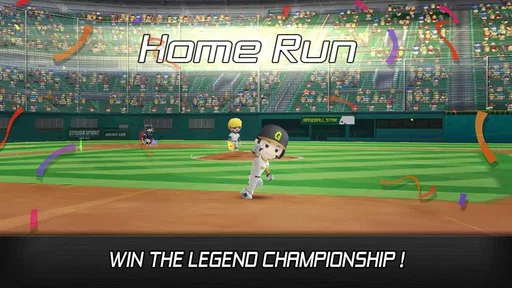
Visually, the game is a treat. The graphics are vibrant and detailed, capturing the essence of a live baseball game. The stadiums are beautifully rendered, and the player animations are fluid and realistic. It’s almost like being in the stands watching a real game. Plus, the sound design is top-notch. The crack of the bat, the roar of the crowd, and even the umpire’s calls all contribute to an immersive experience that can make you forget you’re just sitting on your couch.
Sound and rhythm between pitches
Baseball’s stop-and-start rhythm is a strength here because it gives me a moment to read what is happening before the next action. It also makes the game easier to fit into a small window than a sport built around continuous movement. I’d play with sound on when I want the fuller ballpark feel, but the visual cues and basic match flow matter more if I’m somewhere quiet or listening to something else. That flexibility is useful in everyday settings, though playing silently naturally loses some of the atmosphere the crowd and contact sounds provide.
For a realistic everyday example, this is the sort of game I’d open while waiting for an appointment: a short stretch of baseball can make the wait feel less tedious, and offline play means I don’t need to rely on the venue’s connection. I would not start a league-management session if I only had a minute or two, since the planning side is more enjoyable when I can give decisions some thought. Matching the mode to the time available is a small choice, but it helps the game feel convenient rather than demanding.
Customization and Personalization
One of the standout features of Baseball Star is the level of customization it offers. You can personalize your team’s uniforms and logos, which is a fun way to make your squad truly unique. I found myself spending a good chunk of time just tweaking my team’s look to perfection. Additionally, the player development system allows you to tailor your players’ skills to fit your strategy, which is a big plus for anyone who loves tweaking stats and maximizing their team’s potential.
Finding the right balance for your roster
Customization is most rewarding when it supports a team identity you actually care about. I’d settle on a visual style early, then spend more attention on development choices that suit how I want the squad to play. It is easy to get absorbed in cosmetic details, but the practical payoff comes from making deliberate player-development decisions rather than constantly changing direction. If you enjoy tinkering, that mix of appearance and roster planning gives you several ways to make the team feel personal; if you want a game with no setup between matches, it may feel like extra work.
Compared with a straightforward arcade baseball game, the roster and development elements offer more to think about between plays. Compared with a serious simulation, the approachable controls and self-contained sessions make it less of a commitment. That middle ground is where I see the clearest fit: a player who likes the idea of running a team but does not want every session to become a deep tactical exercise. Someone seeking licensed real-world rosters, elaborate broadcast presentation, or highly detailed baseball management should look for a different kind of sports game instead.
In-App Purchases: A Necessary Evil?
Like many free-to-play games, Baseball Star does incorporate in-app purchases. The listed range runs from about $1.49 to about $86.98 per item, so I’d treat optional spending carefully and decide on a budget before browsing. Purchases can provide a shortcut to building a powerhouse team, but the game is still free to start. I’d first learn which parts of team-building I genuinely enjoy and see how far normal play takes me; spending makes little sense if the main attraction is simply fitting in a quick offline match.
Progress without turning play into a chore
The useful question for a free sports game is not whether every shortcut is tempting, but whether the basic loop is enjoyable without paying. I would give the game time to show how its matches and team choices fit together before considering any purchase. If progress starts to feel like a task rather than a hobby, taking a break is a better response than spending to force a faster result. The in-app purchase range makes that a sensible boundary, especially for younger players or anyone sharing a device; an Everyone rating describes the intended age audience, while purchases still deserve an adult’s attention.
The game has reached more than 10 million installs and is currently at version 1.7.9. It was released on May 20, 2016, and requires Android 6.0 or later. Those details make it worth checking compatibility before installing on an older device, but the main decision is simpler: do you want a baseball game that can accompany short offline breaks, or one built around live competition and extensive simulation? For the first, its premise makes practical sense. For the second, another option will likely suit you better.
Community and Competitions
Engaging with the community is another aspect where Baseball Star shines. There are regular events and competitions where you can test your skills against other players. These competitions can be fierce, but they’re a great way to earn rewards and bragging rights. Plus, it’s always fun to see how your team stacks up against others from around the world.
Who will get the most from it?
I’d recommend this to baseball fans who want a convenient mobile game, especially people who appreciate having a team to shape and a match they can play without an internet connection. It also makes sense for newcomers who prefer accessible controls over a steep learning curve. The average rating of 4.3 and around 13,000 reviews point to a well-established audience, though popularity alone cannot tell you whether its particular pace will suit you. The best test is whether you enjoy the small decisions around a match as much as the hit-and-pitch action itself.
I’d skip it if offline play is not important to you and your priority is a deep online league, constant head-to-head competition, or a close recreation of professional baseball strategy. I’d also think twice if you dislike team progression systems or feel pressured by optional purchases in free games. Baseball Star is at its best when you can enjoy its matches at your own pace, treat team-building as a bit of extra depth, and ignore the urge to rush every improvement.
Baseball Star is more than just a game; it’s an experience. Whether you’re looking to indulge in a quick match or dive deep into team management, this app offers something for every baseball enthusiast. It's a delightful mix of strategy, skill, and good old-fashioned fun. So grab your virtual bat and glove, and step up to the plate—because this game is a grand slam!
My take on its staying power
For me, the lasting appeal comes from having two different reasons to return: the immediate satisfaction of a match and the longer-term interest of building a squad. That pairing gives the game more texture than a simple batting diversion, but it does not make it the right choice for every baseball fan. I would install it for accessible, offline-friendly play and keep expectations grounded: it is a mobile sports game with a team-management layer, not a substitute for a full console season or a live game with friends.
If that sounds like the kind of baseball you want, the free entry point makes it easy to try without committing money. I’d start with a few matches, see whether the controls and pacing click, and only then decide how much attention to give the league and customization options. That is the fairest way to judge it: by whether its particular mix of quick action and gradual team-building fits your routine.
Pros
- Intuitive controls for easy gameplay.
- Offers offline play without internet.
- Customizable teams and players.
- Engaging graphics with smooth animations.
- Regular updates with new features.
Cons
- In-app purchases can be pricey.
- Limited multiplayer options.
- Ads can be intrusive at times.
- Requires substantial storage space.
- AI can be overly predictable.
FAQs for Baseball Star
What is Baseball Star and what makes it unique?
Baseball Star is a mobile game that offers an immersive baseball experience with realistic graphics and engaging gameplay. Unlike other baseball games, it allows players to manage their own team, customize characters, and participate in various leagues and tournaments. The game stands out due to its combination of strategic management and on-field action, catering to both casual and dedicated fans of baseball.
Can I play Baseball Star offline?
Yes, Baseball Star offers offline gameplay, making it convenient for users who might not have a steady internet connection. This feature allows players to enjoy the game anytime and anywhere without needing to worry about connectivity issues. However, some features like online tournaments and leaderboards might require an internet connection to update and participate.
Is Baseball Star free to play, and are there in-app purchases?
Baseball Star is free to download and play, with optional in-app purchases available. These purchases include items like player upgrades, team enhancements, and additional resources. While these can enhance the gameplay experience, they are not necessary to enjoy the game fully. Many players find the free content sufficient for a rewarding experience.
What are the system requirements for Baseball Star on Android and iOS?
For Android, Baseball Star requires at least Android version 4.1 and above, with a minimum of 1GB of RAM for smooth performance. For iOS, the game is compatible with iOS 9.0 or later. Ensure your device has sufficient storage space as the game may require updates and additional data downloads over time.
How can I improve my skills and progress faster in Baseball Star?
To improve skills and progress faster in Baseball Star, focus on regularly upgrading your players and refining your team strategy. Participate in daily challenges and events to earn rewards and bonuses. Engaging with the game’s community through forums or social media can also provide tips and insights from other players, enhancing your overall gameplay experience.


